
Automatic Grade Level Assignment
-
Students can no longer select their own grade level.
-
The system will automatically assign each student the highest grade level they are enrolled in across all their classes.
-
This ensures more accurate reporting and better task recommendations.
Teacher Control (Overrides) 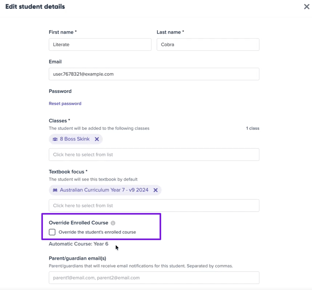
-
Teachers can override a student’s assigned grade level in Student Settings.
-
Overrides require an expiry date, after which the system reverts to the automatic grade level.
-
This prevents temporary changes from remaining indefinitely.
What to Expect After Rollout
-
Students who previously selected a lower grade level may automatically move up to their actual enrolled grade level.
-
This is expected and will expand the range of recommended tasks from Grade 3 up to their current grade level.
Limiting Access to Higher-Grade Material
-
If you want to restrict a student’s access beyond a certain grade, you can use the grade level override in Class Settings.
-
Review each student’s class settings to adjust as needed.
FAQs
Q: Does the grade level update automatically every year?
A: Yes — it updates automatically based on the student’s classes.
Q: How often does it update?
A: It updates whenever students are added or removed from classes. Overrides take priority until the expiry date.
Q: Can I make an override permanent?
A: No — all overrides need an expiry date, after which the system goes back to automatic. You can set the expiry date up to 1 year in the future.
Need Help?
For questions or assistance, contact the Mathspace Support Team.