As part of our re-design of the Mathspace teacher experience, we wanted to allow teachers to be more data-driven. We want you to be able to use the information provided by our reports, and quickly respond by assigning a task to your student or students.
The main result of this goal is the ability for teacher to Create a Task From Anywhere. That, from any page in Mathspace, you will be able to create and assign exactly the right task without leaving the page you are on.
On the left side of every page, just under the Mathspace logo, there is a round button with a plus sign that opens the Create a Task From Anywhere flyout.
Discover more by watching this video.
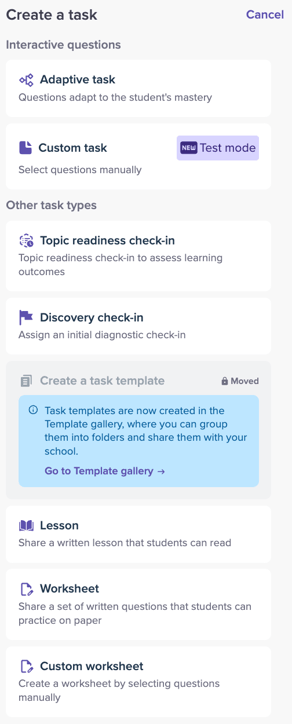
This will open a flyout menu with several options for creating a task.
-
Adaptive Task Creation: Let students work through a particular subtopic at their own pace, with Mathspace choosing the right questions for each individual student.
-
Custom Task Creation: Choose exactly which questions your students practice, from our bank of tens of thousands of questions.
-
Topic Readiness Check-in: Assess students' understanding and readiness before starting a new topic.
-
Discovery Check-in: Assess students' existing knowledge and identify learning gaps within a curriculum strand.
-
Lesson Task Creation: Assign lessons to individual students or classes. These will appear on the Student Dashboard for students to read.
-
Worksheet Task Creation: Assign worksheets for students to complete. These will appear as tasks on their dashboard.
-
Custom Worksheet Creation: Create personalised worksheets by selecting, combining, and arranging questions to suit your students' needs.