
Custom Worksheets can help teachers:
- Adapt existing worksheets without starting from scratch
- Better align content to specific class needs or pacing
- Quickly make adjustments directly from existing resources
How to access Custom Worksheets
You can create a Custom Worksheet in two ways:
- Via CATFA - click the 'Assign Task' button on the left navigation menu.
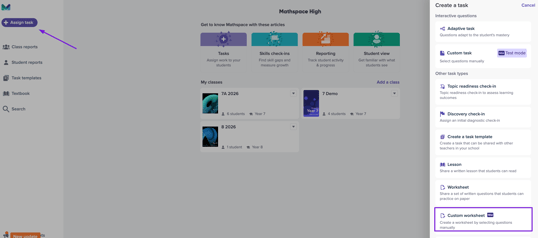
- Using the Customize button on a worksheet page in the textbook
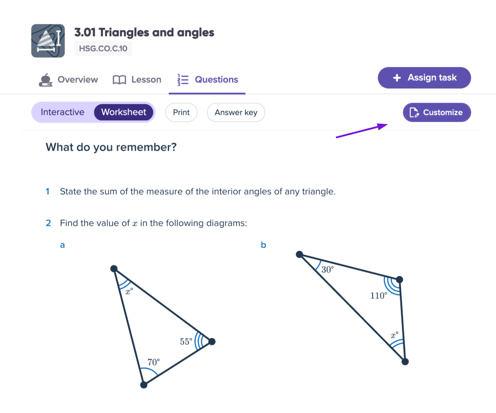
What you can customize
- select the questions you want to include in your task
- choose only subparts of questions you want to include
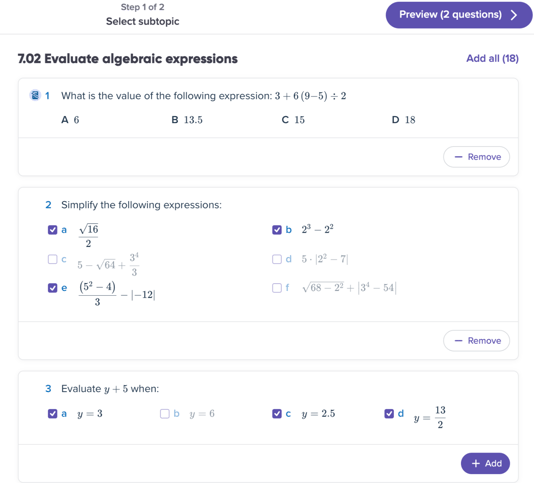
- combine questions from multiple subtopics
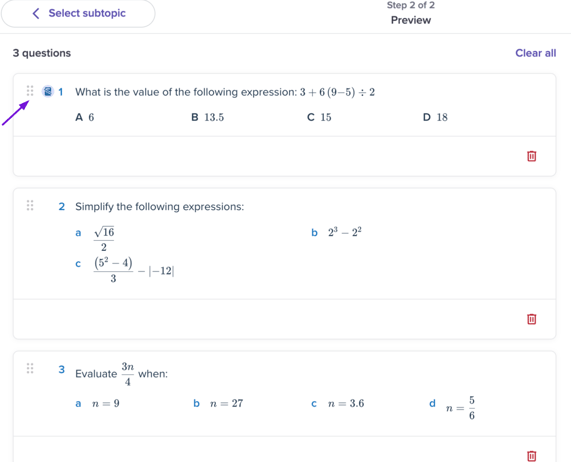
- re-order questions to finalize your task
-
Click and hold the icon beside a question, then drag it up or down to change the order.
-
Beta feature notes
- This feature is currently in beta and may change over time
- Custom Worksheets are only available for our latest edition textbooks.
- There are a small amount of subtopics we are still working on making available for custom worksheets.
- Some functionality may evolve based on teacher feedback
- We encourage users to share feedback or report issues
Troubleshooting
If you don’t see the Customize button on a particular subtopic, then that's because we are still working on breaking down the worksheet into each component problem.You can contact support and we'll try and fast track making that subtopic available for custom worksheets.
Need help?
If you have questions or run into issues, please contact support.