
No setup required
Revision is on by default for every student with a Mathspace account. Their personal revision bank builds automatically from their existing work, so there's nothing for you to enable, configure or assign.
What revision is
Revision is a personal, automatically generated practice bank of every question a student hasn't yet answered correctly across Mathspace. Students can dip into the bank from two places — their dashboard for a quick general warm-up, and the textbook for focused practice on a specific subtopic. When they answer a question correctly in revision, that question is retired from the bank for good. When they get it wrong, it rolls forward for another go later.
The result is a kind of practice that is personal by default. Each student works on the questions that are most useful to them, without you needing to choose, allocate or chase content for individual students.
Where students access revision
There are two entry points for students. The first is a one-tap quick review on their home dashboard, drawn from across all of their work. The second is a Review tab inside any textbook subtopic, focused on that specific area.
Quick review on the dashboard
- Ask the student to log in to Mathspace and stay on their home dashboard.
- Under Your recommended practice, they'll see a Quick review card with five recent questions ready to go.
- Tap Start to open a five-question revision workout.
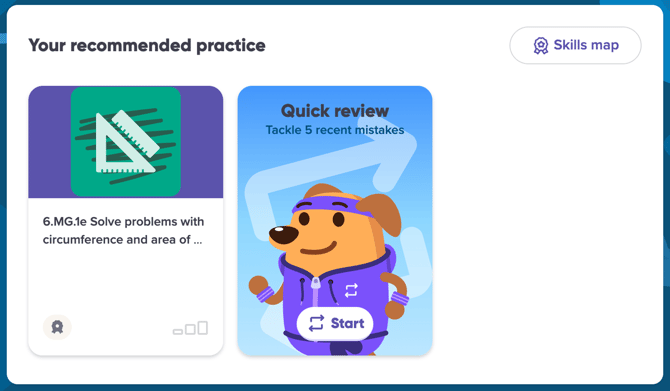
The quick review card on the student dashboard.
Targeted revision in the textbook
- From the top navigation, ask the student to open Textbook.
- Navigate to the topic and subtopic they want to focus on (for example, 4.02 Solve two-step equations).
- Click the Review tab next to Lesson, Questions and My Activity.
- The number badge on the tab shows how many revision questions are waiting for that subtopic. Click Start to begin a five-question workout drawn from that area.
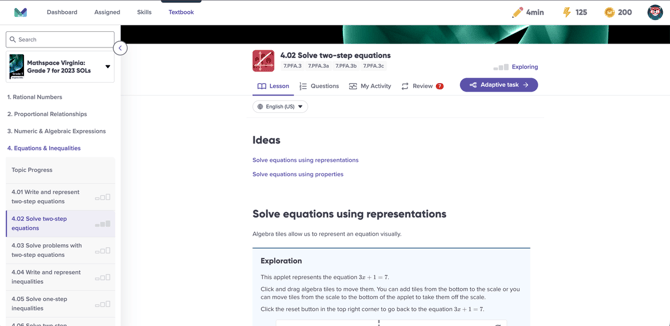
The Review tab inside any subtopic — the badge shows the number of questions currently in the bank for that area.
Tip
The textbook entry point is best when a student knows where they're shaky — for example, before a topic test or after a lesson that didn't quite click. The dashboard quick review is best for a short, general warm-up across all of their recent work.
What students see inside a revision workout
A revision workout uses the same step-by-step environment as a regular Mathspace task, so there's nothing new for students to learn. Each session contains five questions drawn from the student's bank.
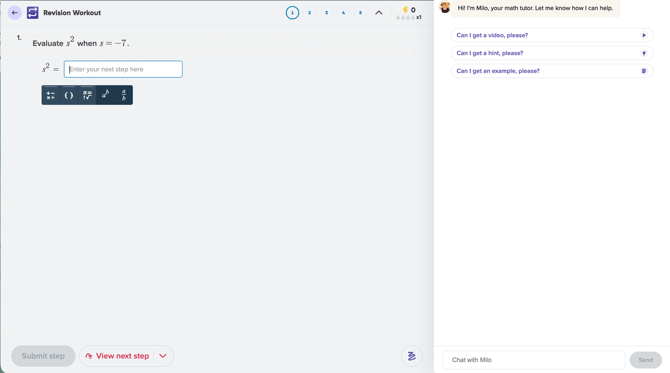
Each question in a revision workout uses the familiar step-by-step input, with Milo available for support.
While a student is working, they can:
- Type each step of their working into the input field, the same way they would in a regular task.
- Ask Milo for a hint, a similar worked example or a worked-solution video at any time.
- Move forward by clicking Submit step, or skip a question by clicking View next step.
What students see at the end of a session
Every revision workout finishes with a short summary screen that shows how many questions the student got right, the points they earned and the coins they collected. Questions they answered correctly are removed from the bank for good; questions they didn't get this time roll forward to a later session.
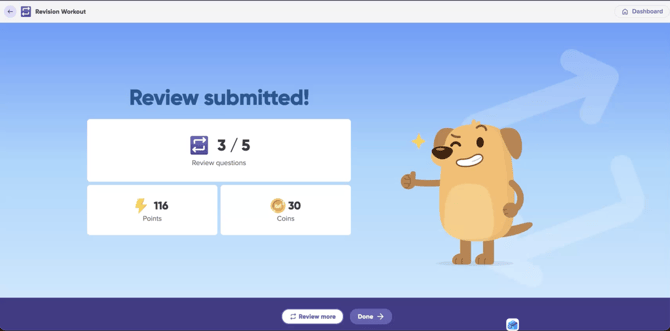
The end-of-session screen — students can click Review more to continue, or Done to head back to their dashboard.
Suggested classroom uses
The bank fills itself, but the habit needs a nudge. Here are three light-touch ways to weave revision into your normal classroom rhythm.
Use it as a five-minute warm-up
At the start of class, ask students to open the quick review card on their dashboard and work through one batch. It primes them for the lesson, surfaces any wobbles from recent topics, and only takes a few minutes.
Pair it with topic tests
In the lead-up to a topic test, point students at the Review tab inside the relevant textbook subtopics. Each student warms up on their own gaps, rather than working through a generic revision worksheet that may or may not match where they actually need help.
Make it part of independent study time
If you run independent study sessions, set the expectation that students start with revision. Because the bank is personal, the practice is automatically targeted — every minute they spend is on a question that matters for them specifically.
Coming soon: teacher-assigned revision
The next release of revision will let you assign a short, personalised revision warm-up alongside any task. Every student in the class will warm up on questions from their own bank, ideally connected to the new task's topic, before starting the task itself. We'll update this article when teacher-assigned revision is live.
Frequently asked questions
How does Mathspace decide what's in a student's revision bank?
The bank is built from every question a student has attempted but not yet answered correctly across their Mathspace work — including tasks, textbook practice and adaptive work. The most recent and most relevant questions are surfaced first.
What happens when a student answers a revision question correctly?
The question is retired from the bank and won't appear in revision again. Each correct answer is a small but real signal that yesterday's misconception is now today's mastery.
What happens when a student answers a revision question incorrectly?
The question stays in the bank and rolls forward to a future session, so the student gets another chance to revisit it once a little time has passed.
How many questions are in a revision workout?
Five at a time. We've kept the session length deliberately short so students see it as a quick warm-up rather than a long revision block. Students can run multiple workouts back to back if they want to keep going.
Do students need a separate Mathspace account or subscription to use revision?
No. Revision is included for every student with an existing Mathspace account at no extra cost.
Can I see what my students have done in revision?
Yes. A student's revision activity appears in their My Activity log alongside their other work, so you can see when they last revised and which questions they worked on.
Can I assign revision to my students?
Not yet — revision is currently student-initiated. Teacher-assigned revision is coming in a future release, and will let you set personalised revision warm-ups as part of your regular task setting.
Get started with revision
Revision is live now. Point your students at the quick review card on their dashboard, or the Review tab inside any textbook subtopic, and let the bank do the rest.